Set up your own key
With the Lifetime License, TalkToType runs on your own key from Groq. Getting one is free and takes about two minutes.
-
Make a free Groq account
Go to console.groq.com and sign up with your Google account or your email address. You do not need a credit card.
-
Create a key
Open console.groq.com/keys (in the menu it is called API Keys) and click Create API Key. Give it any name, for example TalkToType.
Groq now shows your key. It is a long line of letters and numbers that starts with
gsk_. Copy it straight away: Groq shows it only this one time. -
Paste it into TalkToType
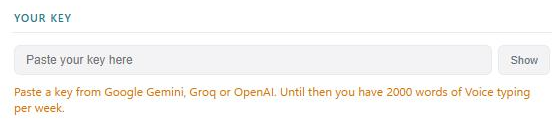
Open TalkToType and click Settings in the menu on the left. Under Your key, click in the field and paste the key with Ctrl+V.
-
Check that it worked
Under the field it now says Groq key. Dictation, recording and summaries work. That is all. There is no save button; the app keeps the key by itself.

Good to know
I do not see “Your key” in Settings
Then the app is either an older version or not yet on the Lifetime License. Scroll down in Settings and click Check for updates; you need version 1.8.1 or newer. Still not there? Send us an email and we will sort it out.
Does Groq really cost nothing?
Groq has a free plan with a daily allowance that is more than enough for everyday dictation and meetings. Most people never pay Groq anything.
What happens until I add a key?
Voice typing keeps working for 2,000 words a week. Recording and summaries start working once your key is in.
Can I use another key?
Yes. A key from OpenAI (starts with sk-) or Google Gemini (starts with AIza) works in the same field. TalkToType sees which one it is. There is one field, so the app runs on one key at a time.
I want transcripts that show who said what
The premium transcript upgrade and the premium summary run on Google Gemini, so for those you need a Gemini key instead of a Groq key. Create one with your Google account at aistudio.google.com/apikey and paste it into the same field. Dictation, recording and summaries then run on Gemini as well.
Keep your key to yourself
Treat it like a password: do not share it or post it anywhere. If it ever leaks, delete it on the Groq page and create a new one.
Stuck?
Email info@talktotype.com and tell us where it goes wrong. We answer personally.